Metadata Providers
Multiple metadata providers are supported to enrich your game library with titles, descriptions, cover art, and achievements. You don't need all providers, so this guide covers popular combos and setup instructions.
Popular combos
Here are some combinations you can use based on your needs:
⭐ The French Connection: ScreenScraper + Retroachievements
- Supports 125+ popular systems
- ScreenScraper provides titles, descriptions, cover art, screenshots and manuals
- Also supports hash-based matching (as of
v4.4) - With the option for 3D boxes and CD/cartridge covers
- Also supports hash-based matching (as of
- Retroachievements provides achievement progress
- Use this if you want to avoid Twitch/Amazon products
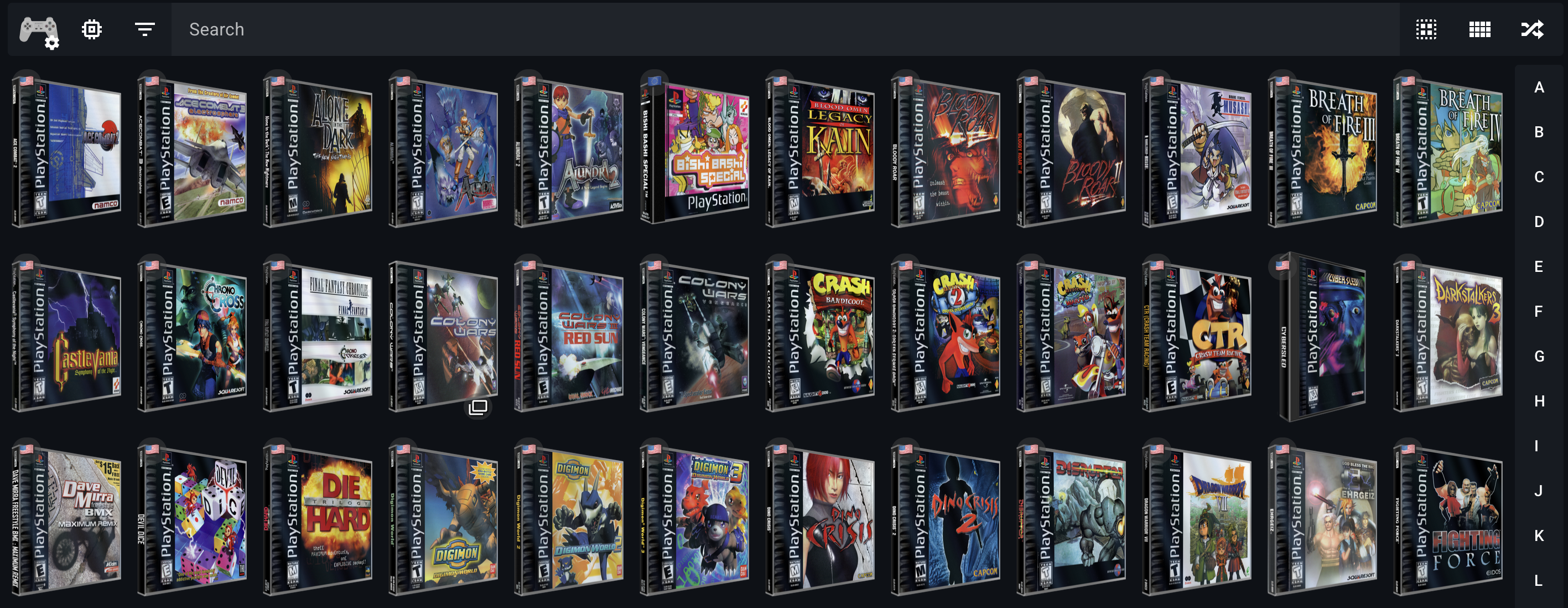
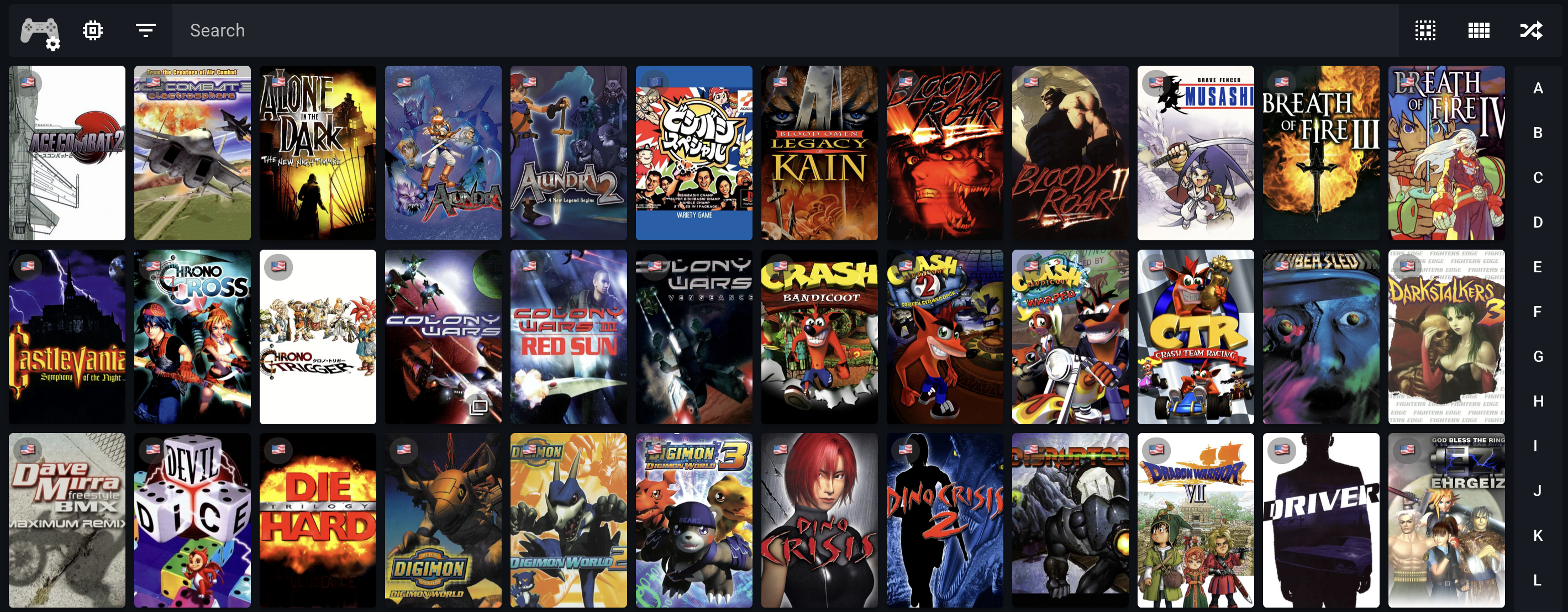
⭐ The Chef's Choice: Hasheous + IGDB + SteamGridDB + Retroachievements
- Supports 135+. popular systems
- Hasheous provides hash-based matching and proxies IGDB data (titles, descriptions and artwork)
- IGDB adds additional metadata like related games and screenshots
- SteamGridDB provides high-quality alternative cover art
- Retroachievements provides achievement progress
- This is the recommended setup for most users
The Twitch Fanboy: IGDB + Playmatch
- Supports the 200+ systems available on IGDB
- Provides titles, descriptions, cover art and related games from IGDB
- Playmatch adds hash-based matching for unmatched files
- Use this if you want a single-provider solution
The Quick Starter: Hasheous
- Hash-based matching only ⚠️
- Proxies titles, descriptions and cover art from IGDB
- Incredibly fast scan times
- For users who want to avoid API keys
Setup instructions
IGDB
IGDB (Internet Game Database) is a popular metadata provider that offers metadata, cover art, screenshots, related games and more.
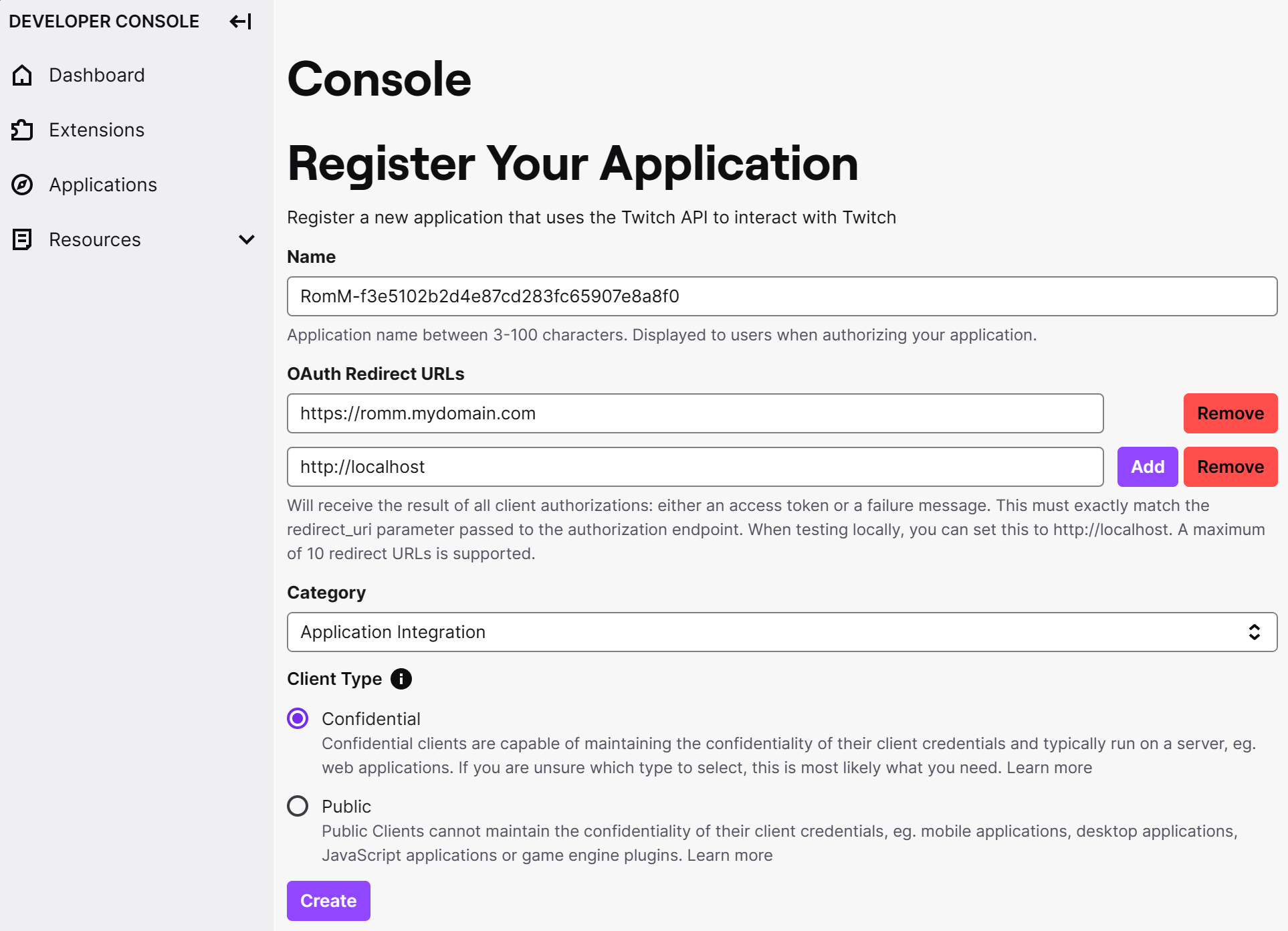
To access the IGDB API you'll need a Twitch account and a valid phone number for 2FA verification. Up-to-date instructions are available in the IGDB API documentation. When registering your application in the Twitch Developer Portal, fill out the form like so:
- Name: Something unique or random like
romm-3fca6fd7f94dea4a05d029f654c0c44borKVV8NDXMSRFJ2MRNPNRSL7GQT - OAuth Redirect URLs:
localhost - Category:
Application Integration - Client Type:
Confidential
Important
The name you pick has to be unique! Picking an existing name will fail silently, with no error messages. We recommend using romm-<random hash>, like romm-3fca6fd7f94dea4a05d029f654c0c44b
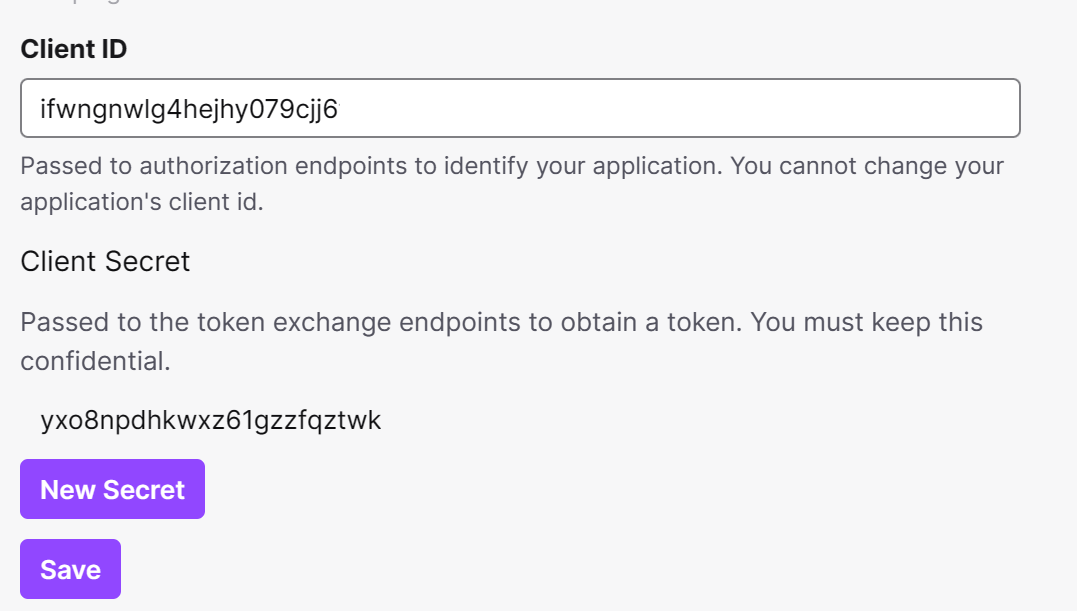
Note the client ID and secret that appear on screen, and use them to set IGDB_CLIENT_ID and IGDB_CLIENT_SECRET in your environment variables.
Screenshots
ScreenScraper
ScreenScraper.fr is a French provider that offers metadata, cover art, screenshots and manuals, along with the option for 3D boxes and CD/cartridge cover art. It supports a wide range of systems and is a great alternative to IGDB.
To access the ScreenScraper API, create a ScreenScraper account and copy the user and password you just created to SCREENSCRAPER_USER and SCREENSCRAPER_PASSWORD respectively.
ScreenScraper's API also expects a second pair of developer credentials that identify the calling application, which RomM sends on every request alongside your user credentials. Our official Docker images have RomM's developer credentials baked in at build time, so there's nothing extra to set.
Running RomM outside our official image
Builds from source and third-party packages (such as the romm package in nixpkgs) ship without developer credentials, and ScreenScraper then rejects every request with 403 Forbidden, which the scanner reports as 401: Invalid ScreenScraper credentials even when SCREENSCRAPER_USER and SCREENSCRAPER_PASSWORD are correct. Set SCREENSCRAPER_DEV_ID and SCREENSCRAPER_DEV_PASSWORD to a valid developer pair to fix it. ScreenScraper issues developer credentials to registered members on request, and the pair inside our official images is also usable. Either way, load them from a secret store or an env file rather than a world-readable config, and never commit them. Nothing else in RomM depends on them, so every other provider and feature keeps working while they're unset.
MobyGames
MobyGames is a metadata provider that offers metadata, cover art and screenshots.
To access the MobyGames API, create a MobyGames account and then visit your profile page. Click the API link under your user name to sign up for an API key. Copy the key shown and use it to set MOBYGAMES_API_KEY.
Important
Access to the MobyGames API is a paid feature. While we will continue to support it, we recommend using ScreenScraper instead, as it is free to use.
LaunchBox
The LaunchBox Games Database is a community-driven database that provides metadata, cover art, and screenshots. Like the Launchbox desktop application, the entire database is downloaded locally and matches games based on their exact filenames.
To enable LaunchBox, set LAUNCHBOX_API_ENABLED=true and ENABLE_SCHEDULED_UPDATE_LAUNCHBOX_METADATA=true in your environment variables. You can customize scheduled updates of the database by setting the frequency on the cron job with SCHEDULED_UPDATE_LAUNCHBOX_METADATA_CRON (defaults to 5:00 AM every day).
You must run a LaunchBox metadata update (either manually, or scheduled via cron) to generate a local .xml file with Launchbox metadata before using it as a metadata provider. The server will parse the local .xml file when trying to match a ROM and fetch metadata from this source.
Hasheous
Hasheous is a free, open-source metadata provider that uses file hashes to match games. It proxies IGDB data for titles, descriptions, and cover art, and can provide Retroachievements IDs for matched games.
Simply set HASHEOUS_API_ENABLED=true in your environment variables, and future scans will start using the Hasheous API.
Playmatch
Playmatch is a free, open source and community driven hash based matching service supporting multiple metadata providers such as IGDB, ScreenScraper, SteamGridDB, Retroachievements and more, hosted by a member of our community.
To enable Playmatch, set PLAYMATCH_API_ENABLED=true in your environment variables.
When Playmatch is enabled, manually matching a ROM through the edit dialog also forwards the ROM's hashes, filename, filesize and resolved provider IDs as a suggestion to Playmatch. Suggestions are reviewed manually before being added to the Playmatch database, which helps improve match quality for the wider community over time.
By default RomM talks to the community-hosted Playmatch instance. To point at your own self-hosted Playmatch, set PLAYMATCH_API_URL to its API base (e.g. https://playmatch.example.com/api/v2).
SteamGridDB
SteamGridDB provides custom cover art for games or collections. It's not accessed through the scanner but from the "search cover" button when manually editing a game.
To access the SteamGridDB API, you need to login to their website with a Steam account. Once logged in, go to your API tab under the preferences page. Copy the key shown and use it to set STEAMGRIDDB_API_KEY.
RetroAchievements
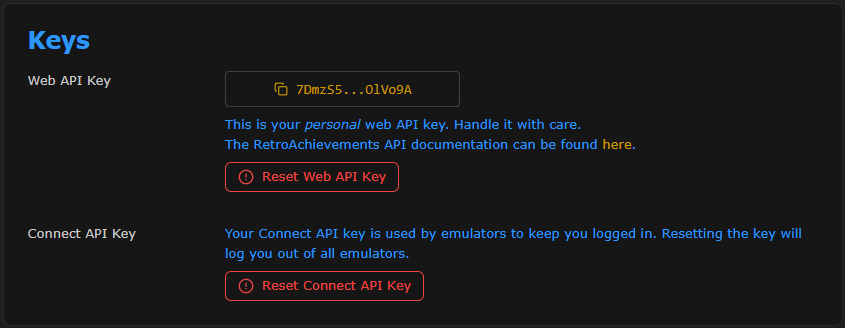
Achievements are displayed from RetroAchievements. To sync, you need to generate an API key from your RetroAchievements account in your settings.
Copy the key shown and use it to set RETROACHIEVEMENTS_API_KEY and perform a UNMATCHED scan targeting the platform you want to match with RetroAchievements.
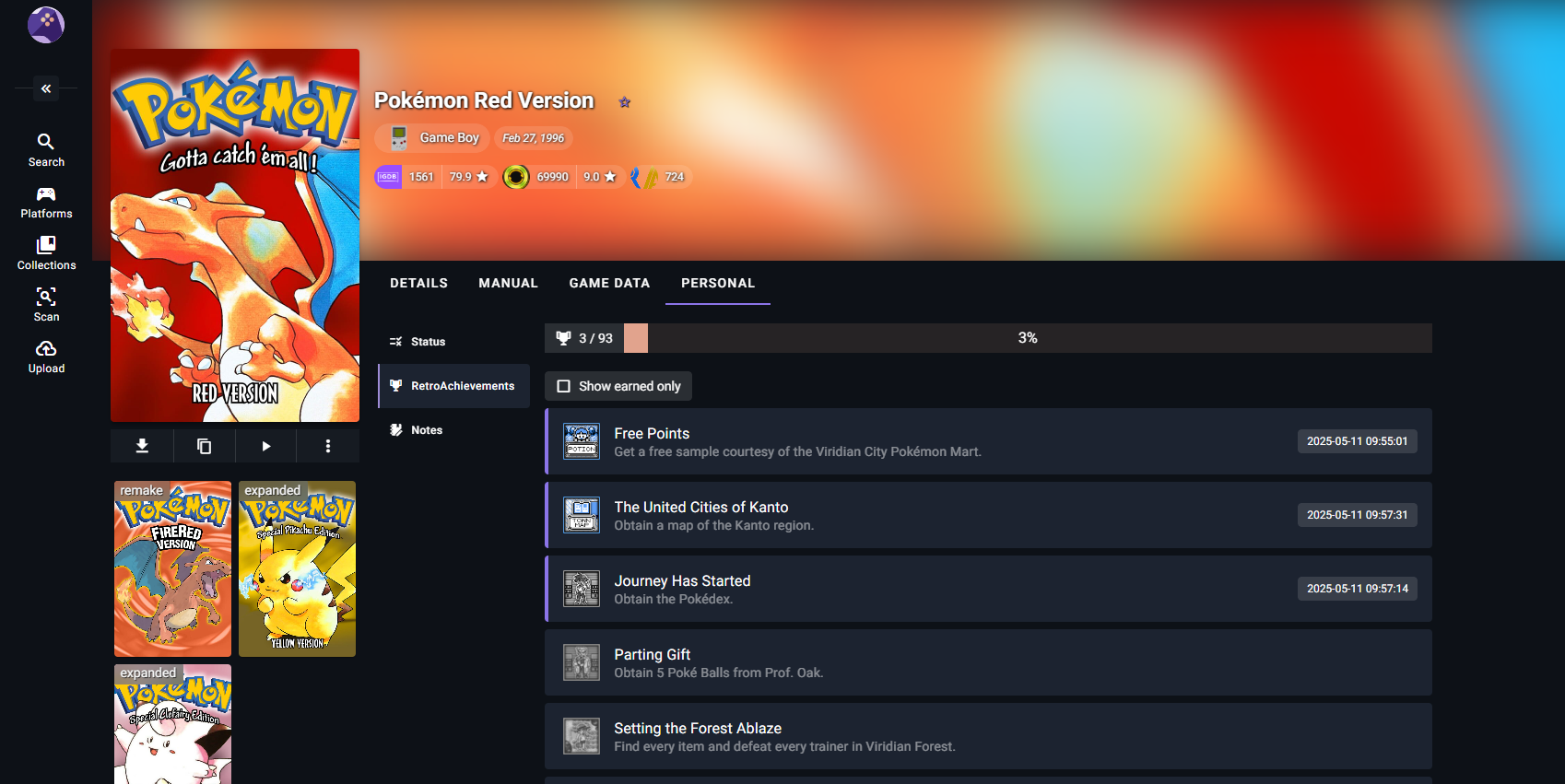
After that, each user needs to set their own username in their profile and sync it with RetroAchievements. A new Achievements tab will appear in the Personal tab in the game details.
To avoid unnecessary API calls, a cached file with the RA database is stored locally. Refresh time for that cache file can be changed with the environment variable REFRESH_RETROACHIEVEMENTS_CACHE_DAYS.
Screenshots
Flashpoint
The Flashpoint Project Database is a project that enables metadata for 180,000+ flash and browser-based games. Enable this metadata source with the FLASHPOINT_API_ENABLED=true environment variable. If you are adding this provider to an existing setup, perform a UNMATCHED scan with Flashpoint selected to update an existing platform.
HowLongToBeat
The HowLongToBeat project provides game completion times for more than 84,000 games. Enable this metadata source with the HLTB_API_ENABLED=true environment variable. If you are adding this provider to an existing setup, perform a UNMATCHED scan with HowLongToBeat selected to update an existing platform.
Game completion times will be added to a new tab on the details page for supported matched games.
ES-DE gamelist.xml
EmulationStation, and its modern successor ES-DE, use a custom XML format to store game metadata. RomM parses this format and imports the assets as cover art and screenshots. You'll need to store the gamelist.xml file and any related assets under the platform folder:
library/
└─ roms/
    └─ gba/
        ├─ game_1.gba
        ├─ game_2.gba
        ├─ gamelist.xml
        ├─ 3dboxes/
        │  ├─ game_1.png
        │  └─ game_2.png
        ├─ covers/
        ├─ screenshots/
        └─ etc...
<?xml version="1.0"?>
<gameList>
    <game id="12345">
        <!-- Path of the ROM file -->
        <path>./game.gba</path>

        <!-- Recommended properties -->
        <name>Game Title</name>
        <desc>A fun game to play</desc>
        <lang>en</lang>
        <region>USA</region>

        <!-- Additional properties -->
        <rating>0.8</rating>
        <releasedate>19990615T000000</releasedate>
        <developer>Developer Inc.</developer>
        <publisher>Publisher Co.</publisher>
        <family>Game Series</family>
        <genre>Action</genre>
        <players>1-2</players>
        <md5>f1234567890abcdef1234567890abcde</md5>

        <!-- Media properties -->
        <image>./images/game.png</image>
        <cover>./covers/game.png</cover>
        <backcover>./backcovers/game.png</backcover>
        <box3d>./3dboxes/game.png</box3d>
        <fanart>./fanart/game.png</fanart>
        <manual>./manuals/game.pdf</manual>
        <marquee>./marquees/game.png</marquee>
        <miximage>./miximages/game.png</miximage>
        <physicalmedia>./physicalmedia/game.png</physicalmedia>
        <screenshot>./screenshots/game.png</screenshot>
        <title_screen>./titlescreens/game.png</title_screen>
        <thumbnail>./thumbnails/game.png</thumbnail>
        <video>./videos/game.mp4</video>
    </game>
    <game id="54321">
        ...
    </game>
    ...
</gameList>
ES-DE metadata
Here are the text properties that will be read from gamelist.xml.
| Property Name | Description |
|---|---|
| name | Game title |
| desc | Game description or synopsis |
| lang | Game language (en, es, it, etc.) |
| region | Game region (us, eu, jp, etc.) |
| rating | Game rating score |
| releasedate | Game release date |
| developer | Developer company |
| publisher | Publisher company |
| family | Game franchise or series |
| genre | Game category or type |
| players | Number of players supported |
| md5 | ROM file hash identifier |
ES-DE media
There are two ways media files are mapped: first it looks at gamelist.xml for properties, and it falls back to looking at nested folders for images that have the same name as the ROM.
| Property Name | Folder Name | Description |
|---|---|---|
| image | images | General game image |
| cover | covers | Front cover artwork |
| backcover | backcovers | Back cover artwork |
| box3d | 3dboxes | 3D box artwork |
| fanart | fanart | Fan-made artwork |
| manual | manuals | Game instruction manual |
| marquee | marquees | Arcade game marquee or header |
| miximage | miximages | Composite or mixed artwork |
| physicalmedia | physicalmedia | Physical media (cartridge, disc, etc.) |
| screenshot | screenshots | In-game screenshot |
| title_screen | titlescreens | Game title screen |
| thumbnail | thumbnails | Small preview image |
| video | videos | Gameplay video or trailer |
ES-DE settings
Here are the settings you need to change to read your artwork and gamelist.xml files from the same folder that holds your ROMs.
-
Open the ES-DE settings file:
- Linux/macOS:
~/ES-DE/settings/es_settings.xml - Windows:
C:\Program Files\ES-DE\settings\es_settings.xml
- Linux/macOS:
-
Make these two edits (add the lines if they don’t exist):
<string name="MediaDirectory" value="/path/to/ROMs/folder" />
<bool name="LegacyGamelistFileLocation" value="true" />
MediaDirectory="/path/to/ROMs/folder"download artwork into the same directory that contains the ROMs (should matchROMDirectory)-
LegacyGamelistFileLocation="true"forces gamelist.xml to be written next to the ROMs instead of inside the ES-DE config folder -
If you already have scraped artwork, copy/move the systems from
~/ES-DE/downloaded_media/and~/ES-DE/gamelists/into your ROMs folder
After a restart, ES-DE will place new artwork and the updated gamelist.xml directly in roms/<system>/, which is the expected layout.
Metadata Tags in Filenames
Scans will now parse custom metadata tags in the filename that match specific patterns, and use them to fetch game metadata for the specified ID. The supported tags are:
(igdb-xxxx) for IGDB (moby-xxxx) for MobyGames (ra-xxxx) for RetroAchievements (ssfr-xxxx) for ScreenScraper (launchbox-xxxx) for Launchbox (hltb-xxxx) for HowLongToBeat
Filenames will not be renamed to add tags, as they are a non-standard formatting system and could create conflicts with other software.
Boxart styles and media types
The gallery renders one piece of cover art per game card. Which one it shows is controlled by the Boxart style picker, a per-user setting under Settings → User Interface. The options are:
| Boxart style | Setting value | Media type fetched by the scanner | In scan.media by default? |
|---|---|---|---|
| 2D Box | cover_path |
box2d |
✅ Yes (always enabled) |
| 3D Box | box3d_path |
box3d |
❌ No |
| Physical | physical_path |
physical |
❌ No |
| Mix Image | miximage_path |
miximage |
❌ No |
The picker only changes what the gallery displays, it doesn't fetch anything. The scanner downloads artwork during a scan, and it only downloads media types listed in scan.media in config.yml. The default is box2d, screenshot, and manual, so out of the box only the 2D Box style has art to show.
If you switch to 3D Box, Physical, or Mix Image without adding the matching media type to scan.media, your cards will come up blank even though the setting clearly "took" in the UI.
To use an alternate style end-to-end:
-
Add the media type(s) you want to
scan.mediainconfig.yml. For all four styles plus the back/spine covers:box2dis always fetched regardless of the list, so you don't strictly need to list it, but keeping it explicit makes the list self-documenting. See the fullscan.mediatable for every type (fanart, title screens, marquees, bezels, videos, etc.). -
Re-fetch the art. Most styles come from ScreenScraper, which only pulls media types in
scan.mediaduring a scan. Run an Update Metadata scan on the platforms you want. -
Set your Boxart style in the UI, and the cards should display the newly-downloaded art.
Provider support varies
ScreenScraper is the richest source for box3d, physical, and miximage. If you want 3D boxes across your library, make sure ScreenScraper is enabled and ranked in scan.priority.artwork.
Priority and conflict resolution
When multiple providers return different values for the same field, the winner is determined by scan.priority.metadata and scan.priority.artwork in config.yml. Defaults:
scan:
    priority:
        metadata:
            - igdb
            - moby
            - ss
            - ra
            - launchbox
            - gamelist
            - hasheous
            - flashpoint
            - hltb
        artwork:
            - igdb
            - moby
            - ss
            - ra
            - launchbox
            - libretro
            - gamelist
            - hasheous
            - flashpoint
            - hltb
Reorder these lists to taste. For example, put ss first if you prefer ScreenScraper boxart, or move hltb up if you care about completion times more than descriptions.
See the full Configuration File reference for everything scan.priority can do